
Quick Answer
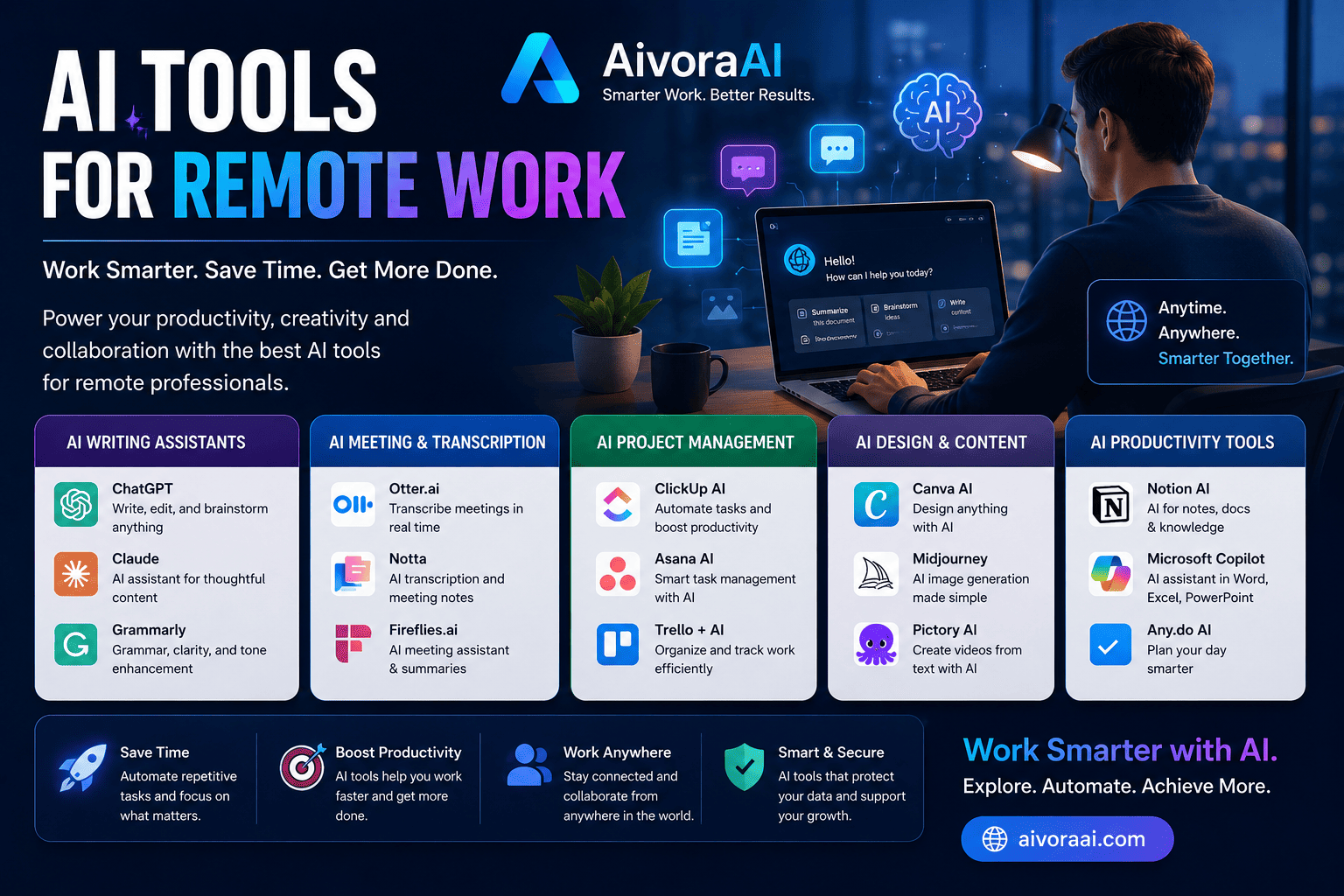
Remote work in 2026 demands AI-powered tools to bridge communication gaps, automate tedious tasks, and maintain team cohesion across time zones. The essential stack includes Otter.ai for meeting transcription, Notion AI for collaboration, Clockwise for calendar optimization, and Zapier for workflow automation. Teams report 40-60% time savings on meetings and 25-40% faster task completion. View the complete remote work AI toolkit →
Remote work has transformed from a temporary perk to a permanent reality for millions of professionals worldwide. But here's the truth that most companies don't advertise: working from home isn't just about swapping your office chair for a couch. It requires fundamentally new tools, new workflows, and new ways to stay connected and productive when your team is scattered across different time zones and home offices.
The challenges are real. You've probably experienced them: endless Zoom meetings that could have been emails, Slack messages that get lost in the noise, time zone coordination nightmares, and the creeping isolation that comes from not having colleagues to chat with by the coffee machine. These aren't just annoyances—they're productivity killers that cost companies billions annually.
Enter artificial intelligence. AI has become the secret weapon for successful remote teams, solving classic remote work challenges that humans alone struggle to overcome. From automatically transcribing and summarizing meetings to intelligently scheduling focus time and preventing burnout, AI tools are making remote work not just manageable—but genuinely enjoyable and highly productive.
In this comprehensive, 3,000+ word guide, we'll explore 20+ essential AI tools that address every aspect of remote work. Whether you're a solo freelancer, a remote team lead, or part of a fully distributed company, you'll discover exactly which tools deliver real results and how to implement them for maximum impact.
🚀 Why AI is Essential for Remote Work Success in 2026
Before we dive into the specific tools, let's understand why AI is uniquely positioned to solve remote work challenges. The distributed nature of remote teams creates friction points that traditional tools simply can't address.
Key Remote Work Challenges AI Solves:
Communication Gaps: AI summarizes meetings, translates languages in real-time, and clarifies ambiguous messages. No more "what did they mean by that?" moments.
Collaboration Friction: AI-powered project management keeps everyone aligned without constant check-ins. Tasks are automatically prioritized and dependencies are tracked.
Time Zone Coordination: AI schedules meetings across time zones automatically, finding the optimal overlap times and protecting everyone's sleep schedules.
Productivity Tracking: AI provides insights into team productivity without micromanagement. Focus on outcomes, not hours logged.
The data is compelling. Remote teams using AI tools report:
- Meeting Efficiency: 40-60% time saved with AI summaries and automated action items
- Communication Clarity: 30-50% fewer misunderstandings with AI-powered writing assistance
- Project Alignment: 25-40% faster task completion with intelligent project management
- Work-Life Balance: Better boundaries with AI scheduling that protects personal time
Now let's explore the specific tools that deliver these results.
🏆 20+ Essential AI Tools for Remote Work in 2026
We've categorized these tools by the specific remote work challenges they solve. Start with the category that addresses your biggest pain point.
💬 Communication & Meeting Tools
Otter.ai is the gold standard for meeting transcription and summarization. It automatically joins your Zoom, Google Meet, and Teams calls, transcribes everything in real-time, and generates AI-powered summaries with action items. Perfect for remote teams across time zones who can't all attend every meeting live.
- Real-time transcription with speaker identification
- AI-generated summaries with action items
- Searchable meeting archive
- Integrates with all major video platforms
- Accuracy drops with heavy accents
- Free tier limited to 300 minutes/month
Fireflies.ai goes beyond basic transcription. It analyzes meeting sentiment, tracks topics over time, and integrates directly with your CRM and project management tools. It's like having a meeting assistant that never sleeps.
Slack AI transforms chaotic message threads into organized, searchable knowledge. It summarizes long conversations, highlights important messages, and helps you catch up after time off. Essential for managing remote team communication at scale.
🤝 Collaboration & Project Management
Notion AI combines docs, wikis, projects, and databases with powerful AI assistance. It's the ultimate all-in-one workspace for distributed teams. AI helps with writing, summarization, translation, brainstorming, and database automation.
ClickUp AI helps write tasks, summarize projects, generate status updates, and predict timelines. It's project management supercharged with artificial intelligence, perfect for keeping remote teams aligned without constant check-ins.
⏰ Time Management & Productivity
Clockwise uses AI to optimize your calendar for focus time, automatically reschedule meetings, and coordinate across time zones. It's like having a personal assistant who protects your deep work time and ensures you don't get double-booked.
Motion automatically schedules tasks around meetings, prioritizes work based on deadlines and importance, and adapts to changes in real-time. It's perfect for remote solo workers who need help managing their time without a manager's oversight.
🧠 Focus & Wellness Tools
Focusmate pairs you with a remote accountability partner for focused 50-minute work sessions. It's like having a virtual coworker who keeps you on task and combats the isolation that often comes with remote work. The community aspect is powerful.
Brain.fm uses AI-generated music scientifically designed to improve focus, relaxation, or sleep. It's perfect for home office environments where distractions are constant. The music adapts to your brainwaves for optimal performance.
🔐 Security & Workflow Automation
Zapier connects 5,000+ apps to automate repetitive tasks—critical when you can't just walk over to ask someone for help. Create multi-step automations that save hours every week. The AI-powered workflow builder makes it accessible even to non-technical users.
1Password securely shares passwords and credentials across remote teams with AI-powered security monitoring. It detects breaches, alerts you to weak passwords, and ensures your distributed team stays secure without sacrificing convenience.
🛠️ How to Implement AI Tools in Your Remote Workflow
Having the right tools is only half the battle. The real magic happens when you implement them strategically. Here's our proven framework for AI tool adoption in remote teams.
Phase 1: Audit Your Remote Work Pain Points
Before adopting any tools, identify your biggest remote work challenges:
🔍 Remote Work Pain Point Audit
Phase 2: Match Tools to Specific Problems
Don't adopt tools just because they're popular. Match them to your specific needs:
- Communication issues? → Otter.ai, Slack AI, Grammarly Business
- Collaboration friction? → Notion AI, Miro AI, ClickUp AI
- Time management struggles? → Clockwise, Reclaim, Motion
- Focus/burnout concerns? → Focusmate, Brain.fm, Headspace
- Security/workflow needs? → 1Password, Zapier, Scribe
Phase 3: Test Before Committing
Most AI tools offer generous free tiers. Use them to validate value before paying:
- Start with free tiers to test core features
- Run a 2-week pilot with a small team
- Measure time saved or productivity gains
- Get team feedback before full rollout
Phase 4: Integrate and Train
Successful adoption requires proper integration and training:
- Connect tools to existing workflows seamlessly
- Create simple SOPs (Standard Operating Procedures) for AI tool usage
- Train team on best practices and common pitfalls
- Set clear expectations for AI-assisted work quality
⭐ Pro Tip: Don't try to implement all 20+ tools at once. Start with 2-3 that solve your biggest pain points, master them, then expand. Quality over quantity always wins.
⚠️ Common Mistakes with AI Remote Work Tools
Even the best tools can fail if implemented poorly. Here are the most common mistakes we see remote teams make:
❌ Don't Do This
Tool Overload: Adopting too many tools creates confusion and reduces productivity. Stick to a focused stack that your team can master.
Ignoring Adoption: Not training your team on how to use AI tools effectively. A powerful tool is useless if no one knows how to use it properly.
Over-Automation: Automating tasks that need human touch and judgment. AI should augment human decision-making, not replace it entirely.
Privacy Neglect: Sharing sensitive data without checking tool policies. Always review data handling practices, especially for confidential information.
✅ Do This Instead
Start Focused: Master 2-3 tools before adding more. Depth beats breadth when it comes to tool adoption.
Train Thoroughly: Invest time in proper training. Create documentation, hold workshops, and designate tool champions on your team.
Keep Humans in Loop: Use AI to augment human judgment, not replace it. Critical decisions should always have human oversight.
Measure Impact: Regularly assess if tools are delivering value. Track time saved, productivity gains, and team satisfaction metrics.
🌍 Building a Remote-First Business with AI
If you're not just working remotely but building a remote-first business, AI tools become even more critical. They're the infrastructure that allows small teams to compete with large corporations.
For entrepreneurs looking to launch location-independent businesses, our guide on online business ideas for USA with AI will show you how to leverage these tools to build profitable ventures from anywhere in the world.
Marketing is crucial for remote businesses. Learn how to create compelling ads that convert using the AI creative ad generation tools that top marketers use to scale their campaigns without a full creative team.
Email remains one of the most powerful channels for remote businesses. Discover the AI email marketing tools that automate your campaigns, personalize messages at scale, and drive revenue while you sleep.
📚 Continuous Learning for Remote Professionals
The remote work landscape evolves rapidly. Staying ahead requires continuous learning and skill development.
If you're serious about mastering AI for your career, consider structured programs like the ones reviewed in our AI in 30 program review. These intensive courses can accelerate your learning and help you implement AI tools more effectively.
For students and young professionals looking to build income streams while studying, our guide on AI income ideas for students worldwide will show you how to leverage remote work and AI tools to earn while you learn.
❓ Frequently Asked Questions
The best AI tools for remote team communication in 2026 include Otter.ai for meeting transcription, Fireflies.ai for meeting intelligence, Slack AI for thread summaries, and Grammarly Business for clear written communication. These tools bridge the communication gaps that often plague distributed teams by ensuring nothing gets lost in translation and everyone stays aligned.
AI tools improve remote work productivity by automating repetitive tasks, summarizing long meetings, optimizing calendars for focus time, providing intelligent task scheduling, and offering accountability features. Teams report 40-60% time savings on meetings and 25-40% faster task completion when using the right AI tool stack.
Most AI remote work tools offer generous free tiers suitable for small teams. Premium plans typically range from $5-20 per user per month. The ROI is substantial when you consider the time saved on meetings, improved collaboration, and reduced miscommunications. Many teams see positive ROI within the first month.
Yes. AI tools like Clockwise and Reclaim.ai automatically protect focus time and schedule breaks, while platforms like Headspace for Work offer AI-personalized meditation and stress management programs. Tools like Focusmate provide virtual coworking to combat isolation, which is a major contributor to remote work burnout.
Successful AI tool adoption requires proper training, clear use cases, and demonstrated value. Start with a small pilot group, document time savings and productivity gains, then roll out to the broader team. Create simple SOPs, designate tool champions, and regularly collect feedback to improve usage.
🏆 Final Verdict: The Future of Remote Work is AI-Powered
Remote work in 2026 isn't just about replicating the office online—it's about reimagining work for a distributed world. AI tools are the catalyst for this transformation, enabling teams to collaborate more effectively, communicate more clearly, and maintain productivity regardless of physical location.
The teams that will thrive in this new reality are those that embrace AI not as a replacement for human connection, but as an enabler of it. By automating the tedious, organizing the chaotic, and clarifying the ambiguous, AI tools free up human energy for what matters most: creative problem-solving, strategic thinking, and meaningful collaboration.
Start small. Pick one tool from this guide that addresses your biggest pain point. Master it. Measure the impact. Then expand. The future of remote work is here, and it's powered by AI. The only question is: will you lead the transformation or watch from the sidelines?
Your best remote work days are ahead—powered by AI, driven by human connection, and limited only by your willingness to adapt.
🚀 Supercharge Your Remote Work Today
Stop struggling with remote work challenges. Get instant access to the curated AI tools, workflow templates, and implementation guides that top remote teams use to thrive in 2026.
🚀 Explore the Remote Work AI Toolkit →🔒 Secure access • Instant setup • 60-day money-back guarantee
Continue Your Remote Work Journey
💬 Need Help Choosing Remote Work AI Tools?
Not sure which AI tools are best for your remote team's specific needs? Drop us a message — we'll help you create a personalized remote work AI strategy!
Written by Varun Lalwani
Varun is the founder of Aivora AI and a remote work productivity expert. He specializes in testing AI platforms and helping distributed teams leverage technology to collaborate more effectively and maintain high productivity without burning out. Read more about Varun